Bible Study Guide For All Ages (review)

20180708_084429

When people ask me which is the best Bible curriculum, I always ask them what they are looking for in a Bible curriculum. Sometimes people want a good devotional; sometimes, they want a scripture memorization program or maybe a study of character traits. There are many options for Bible study, and we have used a variety depending on our needs at the time.

Bible Study Guide For All Ages is an orderly study of the scripture and its key components and characters, starting with Genesis and moving forward.  We had the privilege of reviewing both the Advanced (5th & 6th grade) level and the Beginner (3-K) level.

My goal was for us to be able to use this program as a family. The two levels used the same Bible verses and story for each lesson with different activities. When we tried the first lesson, I was concerned that I had taken on more than we could successfully complete with this review, but within a couple of lessons, we had figured out a rhythm and made it work for the whole family.

As I figured out the program and how it would look for us as a family, it took about 45 minutes to complete the first lesson. However, once I was used to the flow and the children understood what was expected of them, it took us about 20-25 minutes to complete a lesson.
20180708_084335

I used the Advanced (5th & 6th grade) program with my rising 5th and 7th graders. While my oldest is technically aging out of their suggested range, I still plan to use it with him next year as I think he will continue to learn from it, and I like being able to study the Bible together as a family.

At the same time, my four-year-old was using the Beginner (3-K) level. When we first started, I was having a bit of a time working out doing it all together. The four-year-old has a fairly typical four-year-old attention span (aka short) and would get distracted while I helped the older children.

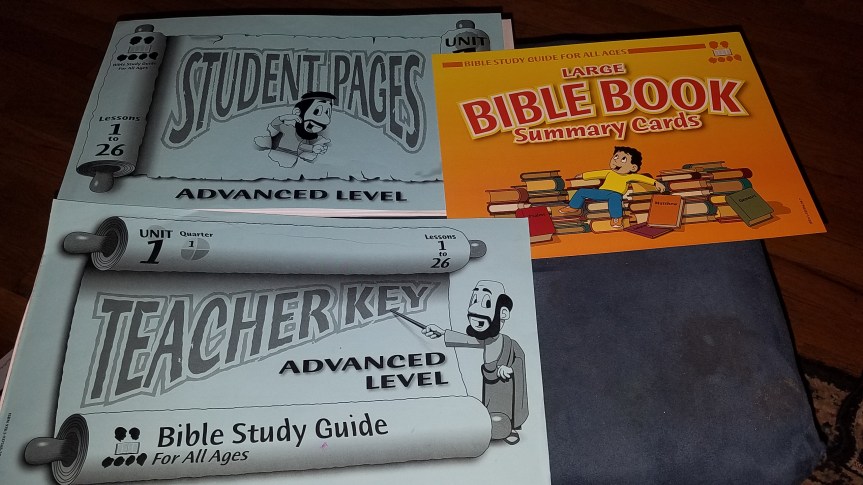
However, within a couple of lessons, we found a rhythm and flow that allowed us to all work together.  I received the consumable workbooks for both levels, a teacher’s guide for the advanced level, and the Bible Book Summary Cards.

Beginner Level

The Beginner (3-K) level has review questions at the beginning of each lesson. There are also some songs that you can sing to help with remembering, but they come on a CD as an additional purchase. I am considering purchasing the CD to use during the upcoming school year.

Next, there is either an activity or discussion questions that lead into the Bible story. For example, in lesson three, one of the discussion questions was about mom having made cookies and told you that you could eat one after dinner and then left the kitchen. You want to eat one now, but what should you do?

Bible Study Guide for All Ages

Next is the Bible story. They give you the scripture reference, and you read it directly from the Bible. This was a feature that I really liked because I knew that they were getting actual scripture, and I could choose the translation that our family found to be most appropriate.

Once I read the scripture there were a variety of questions and activities for the child to complete to help with understanding and remembering the story. For example, he may be asked to circle the correct picture in a series of pictures to go along with the story or to color a person from the story. There might be words to trace for another question. Each story had about 5-10 of these questions.

Once those were complete, there was an Apply It! section where you discussed what you learned and how it should apply to our lives. This was done in fairly simple and easy-to-understand terms that were appropriate for the target age range. There was also a picture that could be colored to go along with the story.  I typically used the picture as something my four-year-old could do while I was working with the older children.

Advanced

The Advanced (5th & 6th grade) level was set up in a similar way but was more in-depth based on the target audience.  They started with memory work and review questions. Included in their memory work was Bible Book Summary Cards. There was a card for each book of the Bible, and you worked with the one for the book you were currently studying.

The front of the card has pictures to help you remember the key points from that book of scripture, and the back and a summary of the book and questions that you can ask to help the students remember what is included in that book of the Bible.

Next, you read the story, and they have a series of questions like the beginner level. Their questions often require them to fill in the blanks or choose the right answer.  Once that is completed, they have timeline or map work. There is a printed timeline on each activity page, and they use that timeline to answer a series of questions and fill in answers on the timeline.

For example, one question in the first lesson had them answer how many years Abraham lived before the birth of Jesus. Another question had them draw Joseph’s coat near a picture of the 12 sons.  The pages with map work are set up similarly with a map instead of a timeline.

Wall Maps and Timeline Sets

They also have a Wall Maps and Timeline set that you can purchase to go with your program. These are maps and timelines to be hung on the wall and used as a group.

They also have timeline figures that you can purchase to go with the wall timeline that the children can add as you progress. This is a great way to help them visualize the timeline of the Bible.  For younger children, there is also a beginner timeline that can be purchased to use with your non-readers. It is set up on cards with large pictures.

Get Active!

Get Active! was the next section. Some of those activities were things like writing down the name of someone they knew that was feeling down. They were to commit to themselves to encourage that person and pray for them.  There were times when these activities were designed around having a small group of students complete the activity (like a skit).

Most of those were easily modified, or you could simply skip that step that day. The lessons are complete enough without that step that I don’t feel like it was a problem to skip it on days when it was not practical to complete the activity.  Then we finished up with the Apply it! section where we talked about and answered questions about how the story affects our lives and what God is teaching us through this lesson.

What did I think, and how will we use this program?

After a bit of a learning curve getting started (particularly with combining ages), we really enjoyed the program. The children were learning the stories, and even though its summer, they did not mind sitting down to do the lessons. My four-year-old absolutely loved that he could participate with the older children and had his own papers.

I liked that it was thorough and stuck to scripture. Because it focused on actual stories and information from scripture and not an interpretation, I think it would be a great fit for various denominational backgrounds.

As a family, we listen to a section of the Bible each day to listen to the Bible in a year and also have some devotionals that we are working through but I plan to continue using this next school year. My plan is for us to complete 2-3 lessons per week as a family. I believe that this program will help give them a strong foundation in knowing what the Bible says and understanding the timeline of events.

There are some great sample pages and information on the website, and I encourage you to check them out to see if they would be a good fit for you. You can also check out the other reviews by our review crew to get more information, learn about the other levels, and see some of the other features that are available.

Bible Study Guide For All Ages {Reviews}Crew Disclaimer

Resource Library and Affiliate Disclosure

When you sign up for the Schoolin’ Swag free resource library, you will get a link and password to the library; we are adding to the library each month with new items. You will also get a bi-weekly newsletter email to keep you updated on what we have going on.

Resource Library 

This post may contain affiliate or referral links, including Amazon affiliate links. As always, I will never recommend a product that I don’t believe in, and you will never be charged more for purchasing through our links. It does help pay for the costs associated with the blog.

The Good and The Beautiful: A Guest Review

I am pleased to bring you this guest review from my friend and fellow home school mom Crystal Levin. She has been homeschooling for 12 years and has children ranging from 16 years old to 4 months. She brings a wealth of knowledge and experience and I’m excited to have her share about the new curriculum she is using this year.

The Good and The Beautiful


34984486_1969332629758121_5536622124862537728_n

I have been promising this review for a while but with life and new babies it just got pushed back.  However it’s because of the new baby that I even tried this curriculum.  I am a homeschool mom to 8 wonderful children, but I had noticed that even I was dreading school. When that happens I know it’s time to reevaluate what we are doing.  Enter The Good and The Beautiful.  This curriculum is fairly new to the homeschool scene and made all kinds of promises.  I have to tell you they were promises that I loved.  It combines grammar, Art study, handwriting, spelling, literature, and geography into ONE.  All of this and and zero prep, it was really too good to be true.  I decided that at the price point I didn’t have too much to lose so I bought Pre K, Kindergarten and Level 5.

The quality of the materials is amazing. The pages are a heavier paper and it is in full color, something that’s important to my girls.  It truly is zero prep, I open the book and read the lesson with my girls and we are done.  Each lesson is packed with ONLY important information. I cannot tell you how much that means to me, I do not need 20 worksheets on the A sound but give me a card to review for a min or so before the lesson and I’m good.  The Pre K and K is just what you’d expect there is phonics work and poetry memorization along with letter formation practice and practice using each new sound you learn.  Pre K also goes over numbers and even starts Art Study.  The phonics cards are laminated and numbered and each lesson tells you what you need.   The Pre K even has hands on activities that use house hold items such as pennies or cotton balls.  The best part, It only takes me about 10 to 20min per kid for the pre K and K and in that time I feel like they have had a full, meaningful lesson with zero fillers.

Now once you get to the upper level it’s a bit different.  Each child has a check list that tells them what they are to do for the day.  The book TELLS the child how their week will be structured. They do poetry memorization every other day and alternate days between grammar flash cards and geography flash cards. As the parent I spend about 5 min reviewing these with my student (I have 2 in level 5 at the moment) Next you do sentence dictation. Each day you read 5 sentences to your student, they write them down and you check, any words misspelled they correct and then write 5 times.  This takes maybe 5 or 6 min depending on your student.  Then my favorite part is the shared reading. You and your student take turns reading to each other.  Each day it’s about 2 ½ pages. Once that’s done the student completes the work in their book and you are done.  The student then does independent reading in their reading book for the time you decide. In our family it’s 10min.


Every aspect of this curriculum is very well laid out. Everything has been planned for you and it is wholesome.  It truly lives up to its name, The Good and the Beautiful.  They don’t just stop at grammar however they also do Science, History and Math as well as Art. They also have a Nature Notebook and Creative Writing Note book.  Right now we are also using their science and my daughter wanted the Creative Writing Notebook.

I love how easy the creative writing notebook is for her to use. It starts out by giving you the tools to write. It has you describe colors and sounds, textures and colors.  Once you have done that it starts building your creative writing skills. It has made a nice addition to her school work and is something she actually ASKS to do and as a mom it doesn’t get much better than that!

Science is set up as unit studies and takes about 8min of prep.  You have to look at the material list for the experiments (all house hold items) and maybe print off a sheet for your children.  I took about an hour and laminated all the vocabulary cards and put together all the mini books so I wouldn’t have to do that later.  Each lesson is easy to follow.  You review words that you need to know, do an experiment if applicable and read.  There are options to find other books on the topic you are studying as well as how to go beyond the basic lesson for your older students. With the Water Unit there is the option to buy a book pack and I did. I cannot tell you  how much I love the curriculum I have used so far. It has truly helped me simplify my homeschool while still having a solid quality curriculum.  This is a Charlotte Mason style curriculum and so it reflects the values found in the Charlotte Mason style of homeschooling.

This slideshow requires JavaScript.

So, how much will you spend on this? Not very much at all, I find this is a very affordable curriculum. You can either purchase the PDF which is very inexpensive or buy the physical curriculum.  I chose to buy the physical because after look at printing costs and the expense of my time I would much rather buy it all done.  Their website is very well laid out and the folks that monitor their Facebook page are very responsive. I will continue using this curriculum with my children.  We are all using the Science and so far 4 are using the literature.  I have another child who uses her own thing. I have been using this for a few months now and so far I’m really happy!!

Free Resource Library and Affiliate Disclosure

When you sign up for our free resource library you will get a link and password to the library, we are adding to the library each month with new items. You will also get a bi-weekly newsletter email to keep you up to date on what we have going on.

Resource Library

This post may contain affiliate or referral links, including Amazon affiliate links. As always I will never recommend a product that I don’t believe in and you will never be charged more for purchasing through our links. It does help pay for the costs associated with the blog.

There are a few great Kindle deals going on right now!

The Last Archer (Green Ember Series) is only $.99 (prices subject to change)

The Black Star of Kingston (Green Ember Series) is FREE (again always check Amazon changes prices frequently)

Memoria Press Classical Composition I: Fable Review


Classical Composition I: Fable Set

Finding a writing program for my twelve year old is one of the biggest challenges I face in our homeschool. I had heard great things about Memoria Press and I was excited to review their Classical Composition I: Fable Set. This set includes a teachers manual, instructional DVD, and a consumable student book. The book has twenty lessons, each featuring a different fable, and we were completing a lesson over the course of two weeks. Depending on your child you could move faster or slower than we did.

For each lesson my son would watch the video instruction and then complete a series of eight assignments. During the instruction the fable was read aloud and they discussed the vocabulary and various components of the fable.  Those assignments included looking for examples of the three plot components of recognition, reversal, and suffering. Then they would look into variations using synonyms to vary sentences from the fable associated with that lesson. Then they summarize the fable by creating an outline. I loved that in the instructional video they went step by step through the outline for the first lesson to show them how to create an outline and give them a good example moving forward.

Next, they are asked to do a written narration of the fable. They include a scoring guide for the written narration if you choose to score those. Depending on your child you may also want to start with a verbal narration and then do the written narration.

Then they move into a set of two paraphrases. The first paraphrase they are asked to use three different figures of description. For example in lesson 2 they are asked to use anemographia, dendrographia, and ethopoeia in the first paraphrase. Depending on the lesson they are asked to write the second paraphrase either by reduction, leaving out all extra details, or by starting at a place other than the beginning of the story.

Next the student completes the Variations Part 2 component. This is again using synonyms to vary sentences from the fable. This helps them work on using creativity but still keep the meaning of the original sentence.

Finally, the students finish the lesson with a final draft of one of their two paraphrases. They take the paraphrase that they wrote and find any mistakes or omissions. Then they write a final draft of that paraphrase. This is the culmination of what they have learned in the lesson and helps prepare them to write other papers in the future.

I loved the video instruction for this course. By having it on video it took the pressure off of me as the writing instructor and allowed my son to do some of this independently. I still worked closely with him since writing is a struggle for him. The instruction was easy to follow and included examples to show the student what was expected. Since it was broken into the various components it was easy to watch just the instruction we needed for that day.

This is a very thorough and classical education style writing program. It is well written and easily implemented. That said, my son did not like the program. He found it to be too repetitive and a little overwhelming.  He struggles with writing and while this program would probably help improve his writing, it was a struggle to get him to complete the lessons because he disliked the repetition of narrating, multiple paraphrases, and a final draft of the same story. While it was not the right fit for my son, the technique is sound educationally and would benefit many students who want to improve their writing.

If you are looking for a classical style writing program that is well presented and easy to implement then I recommend the Classical Composition I: Fable Set. If your family like ours is used to a more relaxed ‘Charlotte Mason’ approach to writing, this will be very different and may be a little overwhelming to your student. Memoria Press has many wonderful products and our Crew has reviewed a variety of them so click the link below to read more reviews.

New American Cursive & Traditional Logic {Memoria Press Reviews}Crew Disclaimer

Resource Library

When you sign up for the Schoolin’ Swag free resource library you will get a link and password to the library, we are adding to the library each month with new items. You will also get a bi-weekly newsletter email to keep you up to date on what we have going on.

Resource Library 

This post may contain affiliate or referral links, including Amazon affiliate links. As always I will never recommend a product that I don’t believe in and you will never be charged more for purchasing through our links. It does help pay for the costs associated with the blog.

Home School Navigator Review

Home School Navigator

Sometimes a review turns up a program that solves a problem you didn’t know you had. When I took the opportunity to review the Home School Navigator Reading and Language Arts Curriculum by Home School Navigator and their novel studies with interactive notebooks, I was mostly interested in the interactive notebooks as a way to expand our current novel studies. However, I found that my daughter was really thriving with the program and plan to continue to use it next year.

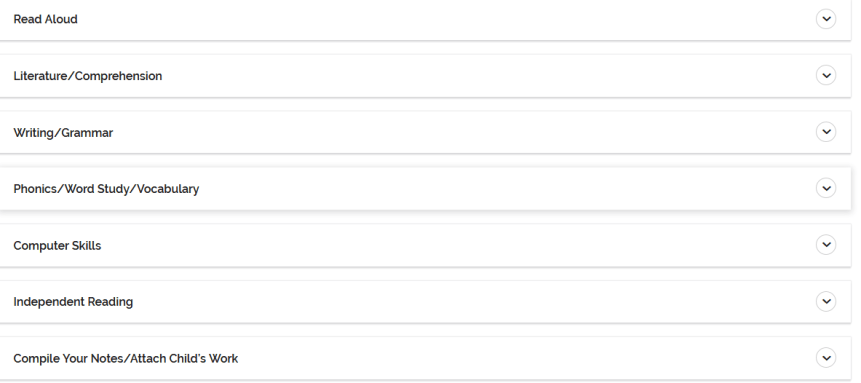
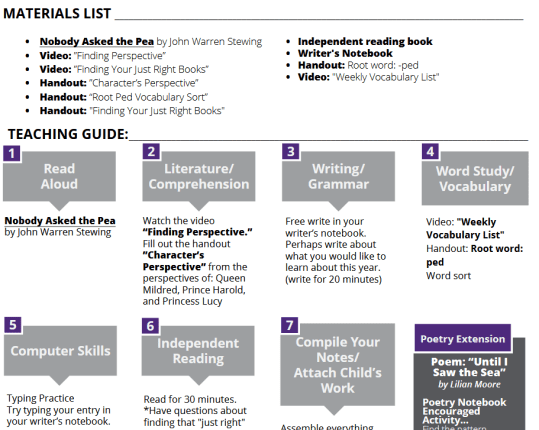
Home School Navigator is an elementary English Language Arts program that incorporates the various components of English Language Arts including read alouds, literature, writing/grammar, word study/vocabulary, and independent reading. They also incorporate computer skills into some of the lessons. Both my 4th grade daughter and 6th grade son used this product. It is designed with the highest level at 5th grade but I felt that the interactive notebooks would be a good fit for him.

Homeschool Navigator 1

When you log-in to home school navigator you choose which level your child will complete. You have one month in which to try out the various levels before you are locked into a single level. Once you choose a level to start you go into month one, week one, day one. At that page there are introductory videos for both the parent and student explaining the program.  For my students I printed out the daily overview sheets and marked through anything that I did not require them to complete. Then gave them the five daily sheets so that they could use them to guide their work throughout the week.

homeschool navigator 3


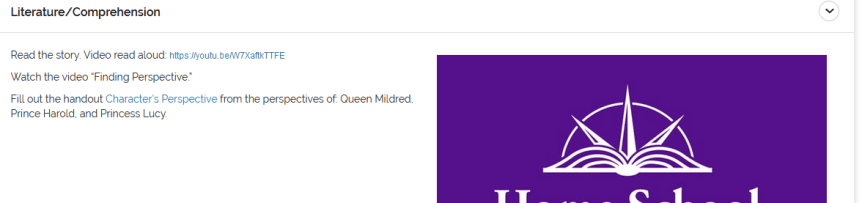
I loved that Home School Navigator linked to videos of each read aloud book! This really helps limit the add on cost of ‘one more book’. It also allowed my children to complete this program much more independently. The one thing I would have changed about this part is that the videos were on YouTube. The videos were fine but we are always careful with YouTube because you never know what commercials will come up or what videos will play next.

homeschool navigator 2


For my son I had him do a few of the other activities each day but mostly he did the interactive notebook and independent reading of Number the Stars by Lois Lowry. I chose this book because it tied in well with our history program for the month and I thought it would be a great way to make those connections. The interactive notebook included bubble maps, vocabulary words, comprehension questions, and other literary components designed to be completed in a lapbook style. I thought it was very thorough without being overly repetitious.  My son enjoyed the book and did well with the questions, though he did say that he would prefer to just answer the questions and not cut out all of the pieces and make the notebook. If he were younger and going to continue with the program, I would simply have him write the answers in his notebook. My daughter however, was disappointed that she did not get to complete an interactive notebook and is excited to have them as part of her work next year.

My daughter started in the first month of the 4th grade program even though she is almost finished with 4th grade because I wanted to get a good idea of how the program worked from the beginning. She completed most of the activities for each week except that I did not always make her complete the writing and computer skills portions. I had to help her with navigation on the first day and then (aside from overriding the parental controls that we use on the computer to allow YouTube) she was able to complete the lessons independently. The days varied to some extent but most days took her about 30–45 minutes to complete the online and written work. In addition, she was assigned 30 minutes of independent reading most days.

She enjoyed the weekly vocabulary work. For her level she was working on prefixes. Her one complaint was that the books were not longer, but I think that the addition of the novel studies and interactive notebooks which come in the following month will solve that issue. There are also poetry extension activities included in some of the lessons. We did not complete those during this review but are excited to do them as a part of our continued use of the program.

I think this program does a good job of offering a comprehensive language arts program that can be tailored to the needs of your family, or individual learner. If you are just looking for a reading program you can only use the reading components or you can mix and match components to suit your needs. This can even be decided on a daily or weekly basis, for example you may decide to skip writing on a particularly busy week or a week when your child is writing for another subject. It is laid out in such a way as to make it easy for an older elementary child to complete independently. Another benefit is the ability to use the record keeping component, especially for those families in states where such records are mandatory.

If you have an elementary aged child, I encourage you to take a look at the Home School Navigator Reading and Language Arts Curriculum Home School Navigator. Their interactive notebooks are an included part of the comprehensive program and can also be purchased individually in their store. I am looking forward to using this program next year with my daughter as she completes the 5th grade level program.


Home School Navigator Reading and Language Arts Curriculum {Home School Navigator Reviews}Crew Disclaimer

Resource Library

When you sign up for the Schoolin’ Swag free resource library you will get a link and password to the library, we are adding to the library each month with new items. You will also get a bi-weekly newsletter email to keep you up to date on what we have going on.

Resource Library 

This post may contain affiliate or referral links, including Amazon affiliate links. As always I will never recommend a product that I don’t believe in and you will never be charged more for purchasing through our links. It does help pay for the costs associated with the blog.

Kids Email Review

Kids EmailIn the interest of honesty, I did not jump on the opportunity to review Kids Email Safe Email for Kids by Kids Email. We had an e-mail program that we had been using without a lot of problems and I was not sure that we needed something new. However, I knew that it might be beneficial to some of my readers, so we ‘took one for the team’. My original plan was for us to use it just with-in our home to test out the features and be able to share our experiences with everyone. After testing it out and trying some of the features we are in the process of switching the children over to using it full time.

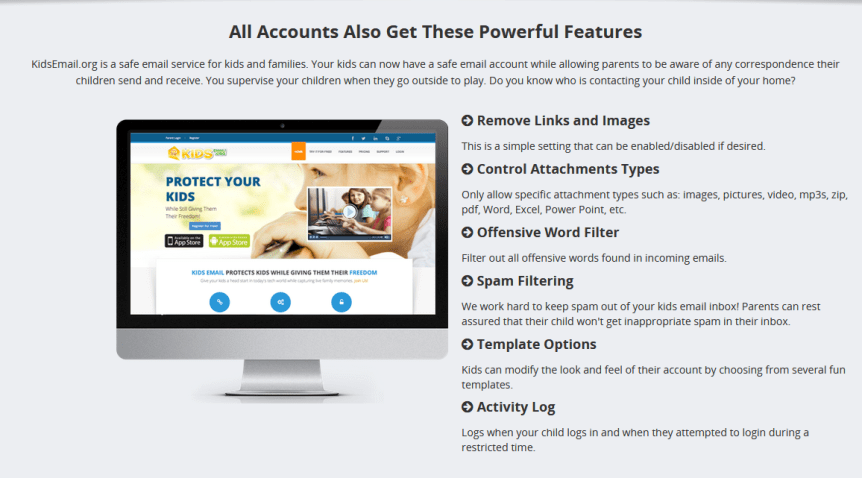
There are many great features included with this email program. There is mail monitoring, time restrictions, a mail queue, several content and language filters, activity log, and attachment controls just to name a few. While we have not yet tried out all of the features, there are several that we tried and really liked.

The mail monitoring and mail queue were features that I knew were requirements in our family for a kids email program. Both my 10 and 11 year olds were using the program and I wanted to make sure I had a good handle on any emails that were coming in. Using this program, I was able to see any email that was sent or received. Those emails were limited to contacts that I had approved. Any emails that did not fit those parameters would be sent to the mail queue. This would allow me to approve it or deny it and see what someone was trying to send to my children.

kidsemailpicture

Time restrictions would have allowed us to restrict the times and days that the children had access or even ground them from their email for a certain amount of time. We did not take advantage of this feature because we already use a timer on their devices but I could see how it would be very helpful if you only wanted them to use email after school was finished or before a certain time at night.

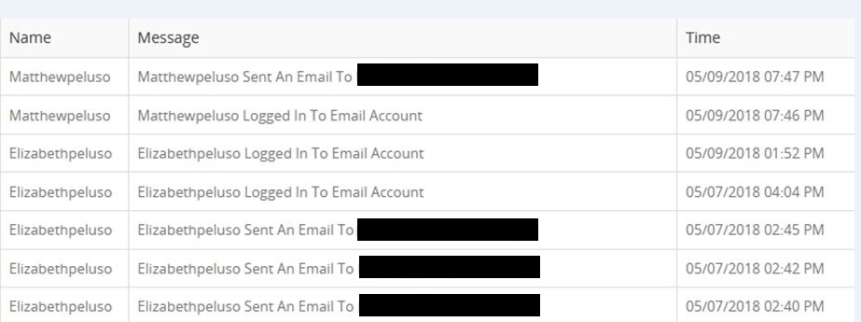
Another feature that I appreciated was the activity log. I could go in and see when they children had been logged in and what e-mails they had sent each day. This was a great way to keep track of their usage in an easy to use format.  As you can see in the picture below it let me know that date and time for each activity.

kidsemail4

As we used the program we did run into one small problem which ended up being operator error. There is a feature that allows or disables attachments. I had allowed attachments but when I sent an e-mail with a word document the attachment was not going through. When I looked into it a little further I realized that the feature had controls that allowed you to choose certain types of attachments to allow and it had defaulted to not allowing word documents. It was a quick fix, but I mention it here so that if you try out this email you know to go into all of the features and set them to allow you to use it as you feel best.

One other feature that we have not used yet, but that I think will be beneficial over the next few years as the children get older is the option to change the email from kidsemail.org to ‘kmail’ and use an interface designed for older children/teens. This is a way to start that transition with older children but still monitor and guide their usage as needed without making them feel like they are using a ‘childish’ program.

We started by simply using this email as a way for me to communicate my children’s daily tasks to them. I would send them an email at night with a list of assignments, chores, and activities for the next day. Since they enjoyed it and the features were so beneficial we are switching it to their primary email. This way they can use it to keep in contact with various family members. If you are looking for a way for your children to be able to use e-mail but still keep them safe and not have to worry about spam or ads, I encourage you to check out Kids Email Safe Email for Kids .

Safe Email for Kids {Kids Email Reviews}

Crew Disclaimer

Resource Library

When you sign up for the Schoolin’ Swag free resource library you will get a link and password to the library, we are adding to the library each month with new items. You will also get a bi-weekly newsletter email to keep you up to date on what we have going on.

Resource Library 

This post may contain affiliate or referral links, including Amazon affiliate links. As always I will never recommend a product that I don’t believe in and you will never be charged more for purchasing through our links. It does help pay for the costs associated with the blog.


Weigl Book Review

For this review I had the opportunity to check out three different types of books from Weigl Publishers and the digital content that accompanied each book. We reviewed Glaciers, A Lion’s World, and There Once Was a Cowpoke Who Swallowed an Ant. These were digital books with interactive content. For each book you receive a PDF of the book and inside the PDF there are instructions for going to the website and entering in the book code to access the digital features of the book. You do need internet access in order to use the digital content and extras but you can view the PDF of the book without internet access once you have it downloaded.

Glaciers Earths Water

The first book was Glaciers from the series “Earth’s Water” published under their imprint Lightbox. This book was geared towards upper elementary and middle grades students and packed with information. While it technically is a nonfiction book, it was so much more than a book.  There were awesome web links, videos, and other activities included as you read through the book. I could have done an entire unit study on glaciers based off of this book and the extra activities and information that were linked in the book. There were maps and even quizzes included with the book. The illustrations were excellent including real photographs as well as diagrams that were beneficial to understanding the science concepts. The end of the book included a cool science experiment. We thoroughly enjoyed this book and plan to go back and revisit it later when it ties into our regular science curriculum. I do want to mention one thing that may be an issue for some of my readers, it did discuss a timeline for glacier movement that spanned millions of years.

A Lions World

The second book we looked at was A Lion’s World belonging to our “EyeDiscover” series. Weigl says that it is intended for a K-2 interest range which I believe is appropriate but my four year old also really enjoyed it. It was much shorter with more basic (age appropriate) information. It included audio aspects that were a great way to keep younger children involved and interested. Benjamin (4) said when reading about lions and watching them run, ” That is like how fast I can run with my big strong legs.” Each page had one sentence and the sound and movement made the book a wonderful experience for my son. After I showed it to him initially he asked several times to read it again.

The third book was a fiction title that was geared toward lower elementary school students, There Once Was a Cowpoke Who Swallowed an Ant. This was a silly rhyming fictional book. You could choose to have it read to the student or for the student to read it themselves. While this was probably our least favorite book as a family, I know some other students who would have really enjoyed the silly story. The ability to have it read to them while they followed along with the words is a great strategy for developing readers.

There Once Was a Cowpoke Who Swallowed an Ant

We enjoyed these books, particularly the non-fiction titles. I recommend them for families looking to add a digital element to their reading or wanting to support developing readers with the read aloud options. Check out all of the available titles by Weigl Publishers and let us know which ones you think your family would most enjoy.

Multimedia Digital Books {Weigl Publishers Reviews}

Crew Disclaimer

When you sign up for the Schoolin’ Swag free resource library you will get a link and password to the library, we are adding to the library each month with new items. You will also get a bi-weekly newsletter email to keep you up to date on what we have going on.

Resource Library 

This post may contain affiliate or referral links, including Amazon affiliate links. As always I will never recommend a product that I don’t believe in and you will never be charged more for purchasing through our links. It does help pay for the costs associated with the blog.

Planet 316 Story Bible App Review

planet3161

When I asked to be on the review team for Planet 316 Story Bible and the companion Planet 316 Story Bible App I was thinking about my four year old but it turns out that my 10 year old enjoyed it as well. This is a beautifully illustrated children’s book of Bible stories and a really neat app by Planet 316 and WorthyKids/Ideals.

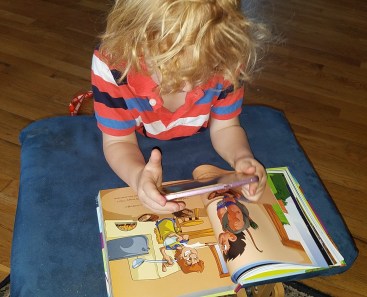
When we first started using it I would sit down with my four year old and let him pick the stories and we would use the app together. My 10 year old saw us looking at the book and app and asked to use it as well. While the stories were geared towards a younger audience she really enjoyed the technology aspect of it and it became something they could do together.

As you chose a story you could aim your phone or certain tablets (apple products) at the pages of the book and make the people and animals ‘come to life.’ They would move and talk on the screen adding an extra dimension to the reading experience. For example on the page where Noah is loading the Ark he says, “elephants check, giraffes check.” and if you touch the animals they make their animal sounds.

In looking at the book itself the illustrations are colorful and beautifully done. My son enjoyed looking through them even when he wasn’t able to use the app or have someone read to him. I also really liked that each story included the scripture reference for where it came from so that you could look it up and read the actual scripture if you chose to do so. Most of the stories are only a page or two which was a great length for keeping the attention of younger children.

We had the benefit of having this book and app for Easter this year so I used the stories leading up to Easter both with my son and on Easter Sunday in my Pre-K class at church. The children loved the stories. My son kept asking me to read them again. When I asked him his favorite stories he showed me the story where Adam was naming the animals and Noah’s Ark first but then he started showing me almost all of them and saying, “and this one.” I think it is safe to say he enjoyed all of the stories we have read so far.
Planet 316 Story Bible and Bible App My one complaint is that it was a big difficult to line up and see using my phone. The app worked on the phone but holding the book and lining up the small screen on my phone so that both myself and the children could see the characters on the phone screen was a little bit difficult. I think using a compatible tablet would make that a lot easier but we did not have a tablet that would work with the app at this time.

All in all I found this to be a fun and engaging activity to do with my four year old. I think it would be most engaging for the preschool and early elementary ages though as in our house, older siblings may enjoy using it with the younger children. This would not replace our family Bible time but was a great supplement. Check out the Planet 316 Story Bible and the companion Planet 316 Story Bible App and let me know what you think.

Planet 316 Story Bible and Bible App {Planet 316 Reviews}

Crew Disclaimer

When you sign up for the Schoolin’ Swag free resource library you will get a link and password to the library, we are adding to the library each month with new items. You will also get a bi-weekly newsletter email to keep you up to date on what we have going on.

Resource Library 

This post may contain affiliate or referral links, including Amazon affiliate links. As always I will never recommend a product that I don’t believe in and you will never be charged more for purchasing through our links. It does help pay for the costs associated with the blog.

A+ Interactive Family Math Review

With a preschooler and a new baby in the house I have been working towards more independent/self study lessons for the older children. So I was grateful for the opportunity to review the Family Math Package by A+ Interactive Math (by A+ TutorSoft Inc.)  with my oldest son. He is a sixth grader who has typically done well in math but struggled some this year with decimals and fractions this year.

Family Math

This program provides online lessons and practice questions followed by online quizzes and tests. When we got started I realized that I needed to show him where to take the quizzes and help him with general navigation around the program’s interface. After that initial help he was able to operate the system independently. I loved that the practice questions allowed him to go back and fix mistakes but the quizzes showed me the score he received on his first attempt. If a child does poorly on an attempt, you can have a new quiz created for them to complete. Since we chose the Family Math Package we had the ability to place him in the grade level that we felt best fit his needs and chose the lessons I wanted him to work on. The Family Math Package allows you to use the programmed order or skipped around to work on the areas of highest need.

We have found that it takes my son about 15-20 minutes to do a daily lesson including practice problems. This length of time is nice for us because it fits well into our philosophy of short lessons to keep attention and it is easy to fit into a busy day. He does work through problems reasonably quickly and it could take a bit longer if you have a student that works at a slower pace.

When I reviewed the first quiz result I was shocked that he only scored a 20/100.  Normally he’s pretty good at testing, and the first lesson should have been a review for him.  So, I asked him about it. “Mom, I thought I could only use the computer. I didn’t use any scratch paper.” Sometimes he does follow instructions! The moral of this anecdote; if  your learners are new to online math it may be worth it to encourage them to work their problems out on paper before answering.

Once he understood how the lessons worked and that he could use his pencil and paper to figure the answers things went smoothly. This week he even came up to me all excited, “Mom, I got a 100, that is three 100s in a row!”

I love all of the reports and data that I can access to keep track of how he is doing without having to constantly look over his shoulder. I can see how he did on the practices and worksheets, what his averages are, what lessons he has completed, and other useful reports from the admin panel. You can see some examples of reports that I had for my son below.

We have enjoyed using this program. For our family, I do not think it would work as a standalone math program this year. My son needs a bit more instruction and practice but it made an excellent review for him and helped him understand some areas he had been struggling with. With the instruction, practice, and quizzes it could be a complete math program for many students depending on the ease at which they learn new math concepts. I intend to use this program to continue reinforcing math concepts and introduce new concepts. He enjoyed the immediate feedback of the online grading and the ability to go back and see what he missed.

If you are looking to foster some independence in math or to review skills that your child is struggling with I suggest checking out the Family Math Package by A+ Interactive Math (by A+ TutorSoft Inc.). If you want even more automation they also offer an Adaptive Math Curriculum that has the student go through pretests and then gives them lessons based on the results of the pretests. You can click below to read reviews about that program from some of the other Crew members.

Family & Adaptive Math Online {A+ Interactive Math Reviews}Crew Disclaimer

When you sign up for the Schoolin’ Swag free resource library you will get a link and password to the library, we are adding to the library each month with new items. You will also get a bi-weekly newsletter email to keep you up to date on what we have going on.

Resource Library 

This post may contain affiliate or referral links, including Amazon affiliate links. As always I will never recommend a product that I don’t believe in and you will never be charged more for purchasing through our links. It does help pay for the costs associated with the blog.

Help Teaching Pro Subscription Review

HelpTeaching

When I agreed to review the one year subscription to Help Teaching Pro by HelpTeaching.com I was expecting to use it with my older two children (ages 10 and 11). However, as we got into the review I found that it also had some great printables for my younger son who turned four during the review period.

HelpTeaching

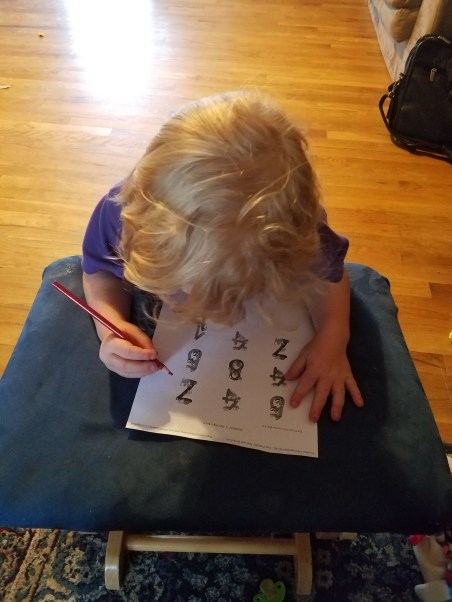
For my four year old, I printed off lots of worksheets. He loves to ‘do school’ when my older children are doing school and while we do lots of hands on activities he likes to have a few worksheets that he can complete.  There were some wonderful worksheets for working on various preschool concepts. We focused mainly on the numbers and shapes worksheets with him because that is something he enjoys learning more about and had recently been working on. They were short and simple which I think is important when you are dealing with preschoolers and he enjoyed completing them. As I look at planning for next year I intend to continue to use these types of worksheets to supplement our hands on activities.

20180415_164857

The older children were more interested in the lessons that are offered as a part of this subscription. There are lessons on a wide variety of topics and subjects but we chose to focus mainly on the various prefix and suffix lessons. These were short video lessons with a quiz that could be taken after the lesson. We worked through them together and the children seemed to enjoy them.

We are also using some of the ready to use math worksheets for review of concepts that they were struggling with this year in math as we prepare for our end of year testing. I have found that printing the worksheets and having the children complete them is best for my students, but they do have the option of online completion which may be a great tool for other families. With that option you can schedule it for a certain day and time and make it timed or untimed.

There are lessons for math, English language arts, science, and social studies. In addition to those categories, the printable worksheets also include seasonal activities, art, music, physical education/health, and vocational education, There are even sections of graphic organizers and study skills.

They have a test maker option that I think could be a great time saver if you are creating tests. You can either use questions from their test bank based on grade level, subject, and topic or you can add your own questions. There is also a worksheet component to this feature that allows you to create math worksheets and games. In the games section you could make a word search using whatever selection of words you want to use. This is a great review for spelling or vocabulary words.

I think there is a wealth of information and resources in this subscription. I do wish that the lesson options were a bit more comprehensive as I think some subjects and ages are covered much better than others. However, there are many great printable worksheets and you can even generate your own tests and worksheets. For most families this is not going to be a complete curriculum but a great supplement. I think Help Teaching Pro would be most helpful to families that were looking for more practice or review or those looking for resources in creating their own lessons.


Help Teaching Pro. {HelpTeaching.com Reviews}Crew Disclaimer

When you sign up for the Schoolin’ Swag free resource library you will get a link and password to the library, we are adding to the library each month with new items. You will also get a bi-weekly newsletter email to keep you up to date on what we have going on.

Resource Library 

This post may contain affiliate or referral links, including Amazon affiliate links. As always I will never recommend a product that I don’t believe in and you will never be charged more for purchasing through our links. It does help pay for the costs associated with the blog.

Apologia Exploring Creation with Human Anatomy and Physiology Review

I am excited to share my review of  Exploring Creation with Human Anatomy and Physiology by Apologia with you today, but first I want to give you a little back story. When I first started homeschooling almost six years ago I started with a ‘box’ curriculum. I figured out pretty quickly that it was not working for us and started creating my own science curriculum. Part of our studies that year included a study of the planets and a family member suggested that I check out Apologia’s Astronomy book as a resource. The children loved it and we ended up using it for the entire semester instead of just the month that we had planned on spending on astronomy. We have been using Apologia ever since. We have enjoyed each book that we tried and Exploring Creation with Human Anatomy and Physiology is no exception.

Apologia sent us the text, Junior Notebooking Journal, Notebooking Journal, and the MP3 CD. When it came in the mail, the children were thrilled to be able to ‘un-box’ their new goodies. My husband has more of a science background than I do and enjoys anatomy so we decided to do this science in the evenings as a family to allow him the opportunity to participate. We all gathered in the living room and my husband would read aloud a section or two of the text and then we would discuss what he had read.

As we went through we did many of the “try this” activities that are included. These are one of my many favorite parts of the curriculum because they provide hands on activities that are quick and easy and often need little to no advance preparation.  For example, in the second lesson where we were learning about bones of them simply had the children hit a table with their hands and then hit the table with a cushion between their hands and the table. This helped to demonstrate the cushioning effect of cartilage between the bones.

There are also more in depth experiments at the end of the lessons and in the Notebooking Journals. The first lesson focuses on cells and the end project was making an edible cell using Jell-O and candy. That was certainly a hit with my kids. There are looking forward to some of the other experiments such as testing for Vitamin C and making a stethoscope.

While we did the reading and experiments together, the children worked through their notebooking journals on their own. My 6th grader used the regular Notebooking Journal and my daughter who is 4th/5th grade used the Junior Notebooking Journal. There are some activities and pages that are very similar but the Notebooking Journal is more involved. For example, in lesson one some of the pages are the same but the Junior Notebooking Journal has several coloring pages (which work great for keeping little hands busy while I read) and an extra ‘lapbooking’ style page. The Notebooking Journal has a crossword puzzle and review questions that are not in the Junior Notebooking Journal.

Did I tell you how much I love having the CD that goes along with this text? There are so many wonderful ways to incorporate it in our lessons. Sometimes we use the CDs to listen on the road. This is a great way to get some school done even on those busy days when we aren’t home. Also, my son loves to listen to audio books before bed and he can just put it into his CD player and listen to it, giving him a nice review of what we have learned so far. Since we do science together I have not used it to help a struggling reader, but I know several families that will allow the child to listen to the CD while they follow along in the book. The CD is the book read aloud word for word so this is a great support for struggling readers.

Anatomy & Physiology

In case you couldn’t tell, we absolutely recommend this product. The science is in-depth and thorough but full of fun and easy hands on projects to make it all stick. You do need to know that it is written from a Christian creationist standpoint. This is a big positive for us and we love how it explains the role of the creator in the science, but we know that some people may wish for a different view point. While you are checking out Exploring Creation with Human Anatomy and Physiology you can also take a look at the books in this elementary series.

Apologia - Exploring Creation with Human Anatomy and Physiology Reviews

Crew Disclaimer

When you sign up for the Schoolin’ Swag free resource library you will get a link and password to the library, we are adding to the library each month with new items. You will also get a bi-weekly newsletter email to keep you up to date on what we have going on.

Resource Library 

This post may contain affiliate or referral links, including Amazon affiliate links. As always I will never recommend a product that I don’t believe in and you will never be charged more for purchasing through our links. It does help pay for the costs associated with the blog.