I am an affiliate with The Old Schoolhouse Magazine, specifically their Schoolhouse Teachers site, which is a fabulous value, and a wonderful help to any homeschooler, but especially those just starting out.
There are over 100 classes available from preschool to high school. Point. Click. Teach. Get planners, ebooks, book keeping resources and great freebies as well! Discounts for HSLDA members and military.
Join monthly for $12.95 each month. GET YOUR FIRST MONTH FOR ONLY $1! One fee serves your entire family. Anyone living in your home can use the site 24/7. There are no per-class or per-child fees and you can cancel anytime. Go to this link to join!
This link provides a video and great info about the services and benefits!
There is so much new interest in homeschooling right now, with more and more things happening in our school systems and more demands and restrictions placed upon them by the government. I really think we are entering the “Golden Age” of homeschooling right now!
Thursday I was in military mode for our schooling. In case you wondered, this journey is not as easy as it seems. By itself, the concept of schooling at home is daunting…I mean, you are trying to teach your own kids, all day. Enough said. 😉 I share today’s skirmishes to perhaps give someone hope, who is plugging along wondering if they will survive. You will. I’ve been at this over a decade, and I’m still kicking. I was sharing this adventure with some fellow homeschool moms at Schoolin’ Swag today, because being transparent is how we learn, and how we receive the help and support we need:
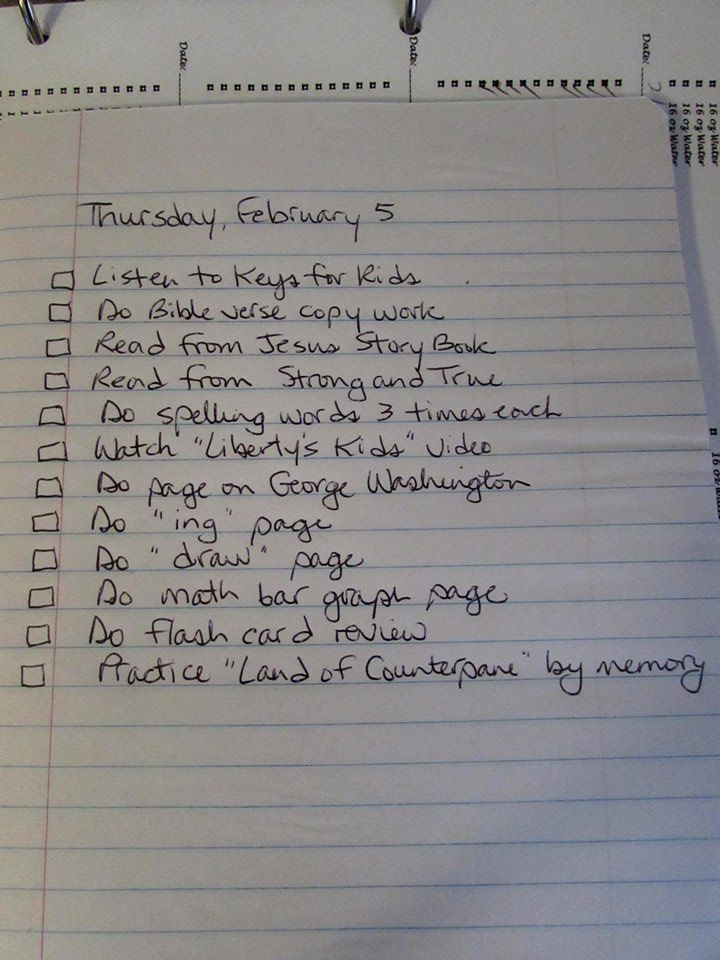
1pm (after repeated stops and starts): “This has been an uphill, both ways, through molasses in winter kind of week. Lots of “I was just…” excuses for not following through, for walking away from lessons, for getting a million drinks of water, for sharpening the pencil down to a ridiculous nub. Oy. So, I decided to use the spiral notebook approach today and give her more control over her own destiny. lol Handed it to her this morning, with a folder containing her worksheets. And, since it is in print, there is no question about what is being asked of her. If she neglects her work, it’s all her. Yep, it’s “Mean Mom” Day. I’ll letcha know how it goes.”
1:30: “I’ve also resorted to having her raise her hand to step away from her work. Even so, a drink of water is requiring time for digestion, apparently. Yes, I’m trying to keep my sense of humor…though I don’t feel very funny. Ordinarily I am all about having a relaxed atmosphere, being spontaneous, having the cat on her lap for reading etc., but “Today is not that day!”
2:00: “She is eagerly checking off boxes. I have Vivaldi playing for her writing/copy work time, which always makes things happier and more productive. And she got 100% on her spelling, which is a huge milestone for her. So grateful to be finally conquering my insomnia/chronic pain issues so that I can have more stick-to-it-iveness, and focus!”
3:00: “And, for those continuing this journey with me…she’s jumping to check off boxes, but still positively dragging her feet with things she knows how to do, just choosing not to do them. So, we had a discussion about choices…that this is a matter of “I won’t”…not “I can’t”. I apologized that part of this has been my fault…I was so tired, so distracted by health issues, that I got lazy, and she learned to respond accordingly. This is a new day. She was rested, and had a good, balanced protein breakfast. She is hydrated. I have my Jeddy’s Blend in the diffuser. And, we delay lunch yet again (for both of us…she needs to see that her actions affect others), until an item is expedited in a timely and excellent fashion, with a right attitude. These are bigger lessons to learn than times tables…these are life lessons which will shape her adulthood. I’m in it for the long haul, and thankful that I get to do this.”
3:30: “And now we are working on the flash cards…each one requires a fan fare prior to the answer…and periodically it is essential to count the “done” pile and the “to do” pile to ascertain how many are finished and how many are left. Oh, and on occasion there is a little monster in her pocket who needs to converse with her about the problem. And then there is the shuffling. I didn’t pray for patience today… 😉 “
Precocious, curious, bright, passionate, with a strong sense of resolve. Our Katherine. Love her so much.
3:45: “Katie is very bright, a quick study, memorizes like crazy, does educational stuff for her play time. Some of this is tedious to her, I know…but that is the stuff of real life. We all need to discipline ourselves to push through things which are not fun. I think we’ve seen a not-so-great trend in recent years, where kid’s school stuff has to involve stickers, prizes, incentives, and fun fun fun every day. Those kids make lousy employees.”
4:30: “The end of today’s story. We finally finished school, at nearly 5pm. She got all her boxes checked off, and I asked her to draw a picture at the bottom of the page, depicting what the next school day *could* look like with a right heart attitude. She liked the idea…it seemed to give her hope. She finished it, handed it to me in tears, apologized, and sat here in my lap for some time. I explained to her the potential I see in her, but she needs to choose wisely. Reminded her that her school matters to God. All of her choices do. Told her I want so much more for her than the direction her current choices would take her in. Made sure she knew that I want her best work…which may or may not be “A’s”. She’s smiling. All’s right with the world.”
These are teachable moments. Her tender heart always wins out in the end, and I am so grateful that I know that. The Holy Spirit in her life eventually helps her sort things out, when she puts her bellowing emotions aside. So true of all of us, right?
Truly, this is messy parenting. But I would much rather have a child who struggles and understands what it looks like to face and conquer self (for another day, or hour, or moment) , than have a kid who conforms out of sheer fear of discipline, tows the line without any friction, but is not aware at all that there is a battle for her soul going on, even during the mundane responsibilities of the school day.
It is not the norm to be a SAHM (stay at home mom) anymore. June Cleaver is a thing of the past. The economy is such that many ladies feel the need to work to make ends meet. If you are one of those ladies, who has to work and then come home to juggle the rest, I congratulate you! We have more single moms than ever before. Just in those times I’ve had my husband out of town, I have felt the challenges…know that I’m in the stands rooting for you, too!! I am grateful I can do what I do. We do without a lot of stuff to make it happen, but I suspect when it’s all said and done, years from now none of us will care much.
Because what I do is uncommon, it is often misunderstood. SAHM’s are viewed as unambitious sometimes. Lazy, maybe. Living a luxurious lifestyle as we eat bonbons and watch soaps. That is not what my life looks like. Here is what my day looks like:
About 7am: Make bed. Do meds. Do exercises. Put tea on to brew. Grab my daily cup of “go juice” and try to scoot through my Bible study time (typically daily reading sent to me via email from ESV, also Valley of Vision, and The Quiet Place, before the youngest gets up (she’s an early riser). Maybe…hopefully… get dressed? No, I don’t wear my pearls to wash dishes or my Sunday shoes to stock the linen closet. I’m not June Cleaver. lol
8-9am: Grab some muffins and tea. Check if anyone needs help on my Facebook homeschooling group (I pop on throughout the day to keep my sanity–I am online for most of our main school stuff anyway– since that is usually the only adult conversation I have most days, my husband being gone working most of the time), and post the freebies and deals for the day. Open Cozi calendar and check what each child has scheduled for school. Open Time 4 Learning and check that yesterday’s progress was accomplished for the oldest two, and see if any papers need to be printed for today’s lessons. Open Easy Peasy and see if anything needs to be printed for the youngest, and/or gather supplies that are needed. Get Katie’s desk set up and papers laid out for the day.
9-10am: Get kids through chores (collectively, they take care of making their beds and keeping their rooms picked up, trash, cat box, bathroom, dishwasher and the oldest does her own laundry), fed, ready for school day. Do devotions with Katie and review her ABC memory verses thus far. Older kids get started on their school day.
10-12 noon: (not necessarily in this order): Guide Katie through all of her subjects, plus handwriting her signature in cursive and memory verse in printing. Throw laundry in. Clean up kitchen from breakfast. Help Michael along with any subjects in which he needs help. Discipleship (see Deut. 6:6,7). Throw laundry in dryer. Referee (our situation allows our kids to know each other pretty well…which is a blessing, and a curse. 😉 ). Answer the phone (my husband is a pastor, so the phone is very busy). Plan supper. Read with Katie and do review of phonics and sight word cards. Referee again. Throw more laundry in. Check on our oldest to see if she needs help (she keeps her own schedule, and must turn in things by 10pm). Sweep kitchen. Tidy, pick up, tidy some more (having everyone home 24/7 means your home is never officially “tidy”…lol).
Noon-3pm-ish: Lunch, PE (which can mean anything from going to the park, walking, biking, Wii Fit, trampoline, or even this), check spelling words, have the oldest demonstrate her weekly ASL skills, assign engineering project for middle kiddo, finish up any remaining school work. More discipleship. Check records in Time 4 Learning to be sure lessons are completed and check grades. Experiments and art projects. Try to remember the rest of the laundry! Select elective activities for each day’s lesson plans for next week (Basic Cooking, Biblical Counseling, American Sign Language, Engineering). Tidy some more. Make shopping list for Friday. Answer the phone some more. Referee some more. Sweep the floor again. lol
3-5pm: Check the homeschool group for needs. Fix supper. Plan and gather resources for tomorrow’s school day. Begin to plan the lesson for Jr. Church, decide the snack, print any necessary resources. Make mental notes for Sunday’s bulletin. Tidy…again. 😉
6-7pm: Supper
7-9ish: Relax with the family. Work on personal writing projects.
9-10: Bed time. Mentally go through the day, realize that although you felt busier than a one-armed paper hanger, you still didn’t get everything done…and once more there are crayons, shoes, toys, socks, scattered hither and yon. Tuck everyone in. This is when we have some of our most meaningful conversations.
10pm: Fall into bed, fairly used up, but grateful.
Lather, rinse, repeat. What does your day look like, SAHM? 🙂
The picture says it all. This is, by far, the best choice I’ve made in homeschooling thus far. The picture shows our son, who has battled with reading disability in the past. Today, his first day of Time4Learning, he asked if he could do extra vocabulary. Extra. Vocabulary. This is unheard of in our home. Anything word-oriented was like pulling teeth for him. In his words, “Mom, I think this is the first time I’ve really liked school!”
Cost
If you sign up as a new member of Time4Learning, you can get your initial month for only $9.99! That is for each student…but an unlimited number of students. This is a great opportunity to test drive the program. There is also a 14-day money back guarantee. If you decide it’s just not your cup of tea, you can get a refund. I’m thinkin’ that’s not gonna happen here! 😉 After your initial month, the cost reverts to the original price of $19.95 per month for your first student, and $14.95 for each additional one . There are no contracts, no hidden costs. You can cancel any time.
Convenience
The site is very easy to navigate, even for our 1st grader. The tutorials and online forums fill in any gaps you may have regarding getting started and using the program. Attendance and record keeping is all done for you. As a parent, I can log in anytime to make sure my kids are completing their lessons, and I can check their progress and grades as they go. School can happen anywhere our laptop can go, and any time we choose, 24/7.
Content
Time4Learning is basic core content, primarily math and language arts, also including social studies and science for most grade levels. There are brief placement tests to determine what level you need for your child. Also, if you find the content is either too difficult or too easy, you have the wiggle room of moving up or down a grade level for any or all subjects. Everything I did was easily understandable for even our 1st grader, and explanations and review are offered for everything. There is a “playground” available (lots of games and education sites and applications to choose from), and you can set the time (which appears in the upper right corner) for how long you’d like your student to work before having access to “recess”. You also determine how long they can remain at the playground, and the timer shuts things down when it reaches 0.
I am adding some reading and writing to do apart from what our kids are doing through this site, but am very happy with it so far! I’d encourage you to try it, if you feel it is time to change things up, or even just use it for review. With the money-back guarantee, nothing is lost if you try it and don’t like it.
If you have further questions, ask away! 🙂 If you’d like a personal invitation from Time4Learning, (and help me out in the process by helping me get credit toward our own schooling) just ask, and I’ll refer you!
**Update**
Here are a few extra tidbits, in answer to some questions folks asked when I posted this on Facebook:
For kids who are not computer savvy, it might be a little more of a challenge; but both of our kids can navigate well. You can mouse over almost all of the buttons and have a verbal directive, which I like, since Katie is reading well, but perhaps not all the words they may use. Some like to use this for summer, or as an additional supplement. The math and language arts are all by general state standards.
You can use it only for the school year, or all year. You can put your account “dormant” for a period determined by you, for a small fee per month…and this retains all of your grades and records. Or, you can start over fresh each year.
I started out with Easy Peasy All-in-One Homeschool (and still highly recommend it!) but with health challenges, this is so much more doable for us right now. I know there are many dealing with various struggles that sap energy, and this makes Time4Learning even more appealing. The beauties of homeschooling…we can morph as much as we want!
Disclosure Statement: As a member of Time4Learning, I have been asked to review their online education program and share my experiences. While I was compensated, this review was not written or edited by Time4Learning and my opinion is entirely my own. Write your own curriculum review or learn how to use their curriculum for homeschool, after school study or summer learning.
The only things I needed to buy for school this year…and it came to less than $30! 🙂
Oh yes…I’m still here. 🙂 Things have been a whirlwind here lately, so I’m having to juggle some priorities.
As you may know, in the space of a few weeks, we candidated at a church, which called my husband as their pastor, we packed, cleaned, and moved all our stuff (with the gracious help of friends). We then had VBS at our church (the Lord blessed with a wonderful turn out for both the children’s morning program and the teen’s evening activities). I was corralling kids from 9 until noon, unpacking like a crazy woman all afternoon, and then back to the church for the teens from 6:30-9:30. Very busy days!
Now, we have only a few boxes remaining in the house, and things are feeling more like home. This past week, I put my nose to the grindstone and got (at least) the first month of lesson plans done for school…which we’ve bumped to the first week in September, all things considered. Wow, so grateful for amazing internet tools! I began combing through resources several months ago to set up lessons for all three kids (1st, 7th and 10th grades). The Lord helped me to find wonderful things (every bit of it free) as well as a superabundance of things I did not need, but simply could not allow to disappear back into the abyss of I’ll-never-find-it-again-unless-I-bookmark-it-but-how-many-things-does-a-person-really-need-in-their-favorites. So I started “Schoolin’ Swag.”
If you are on Facebook, and have an interest in homeschooling, come join the group! We have 300+ members now, with new friends being added every day. Each day there are new freebies, tips and deals from all over the web. I figured it was one way to help others who were in the same boat as I was…feeling overwhelmed, combing through scads of URL’s (some dead, some great, some not so much).
I’ll just share two tools here that I have really enjoyed. The first is from GoalForIt. This site offers free chore charts, with lots of templates and options. There are very cute ones, and some that are more streamlined for tweens and teens. Here is a screen shot of our Katie’s, for example:
The kids get to choose what buttons they want for checking off their responsibilities, and they can earn “moolah” if you wish (which translates into minutes for computer time in our house).
Another tool I am grateful for is Home School, Inc. At this free site, I have set up all my lesson plans for all three students, and the various options allow me to print attendance records, report cards, etc. I can keep track of each student’s progress daily, and it gives them one easy place (for older students) to independently move through their day, checking off their work as they go. I just entered instructions for each course, and URL’s for where they need to go to find their work for the day. It required a few hours of my time, but it will help things to go much more smoothly when school has begun. Here is a screen shot of my main page for all of our courses:
Here is a “School Today” page for our 10th grader:
This view shows here how many courses she has each day. If she clicks on “View Week,” it gives her the week’s assignments at a glance. She also has the option of clicking the down arrow on any given day to see that day’s work. The small boxes next to each date indicate if that day’s work has been complete.
So this gives you a pretty good idea about where I’ve been. Looking forward to a great year. Once the dust settles, I’ll share more postings with you here. TTFN! 🙂
“Simplify” has been a byword for me recently. I’ve had to consolidate, prioritize, dovetail…in order to keep all the “plates spinning” in my life. Part of this process has been bringing posts from my two other blogs into the world of “Strength for Today.” What that means for my readers is that you’ll find more info on the topics of health, fitness and dieting as well as homeschooling and education now in this one spot. It is much easier for me to manage this way, and more efficient as well. So, enjoy all the new stuff just added to the archives! If you were reading at the “Smee Minus Fifty” blog, or “The Old Chalkdust Trail”…these will soon be eliminated as their content is merged into its new home here.
I haven’t blogged much about homeschooling because for the past two years we’ve been doing a virtual academy. This next school year, however, due to an overdose of standardized testing, our son’s special needs, and some other factors, we’ve decided to hit the “old chalk dust trail” once more.
So, in my quest for good, solid, cheap (or even better…FREE) curriculum, I began to accumulate quite a list of goodies. I just couldn’t keep it to myself, so I started a group on Facebook called “Schoolin’ Swag”. If you are on Facebook and are interested, just search the name and request to be added. It is an open group. We’ve been having a lot of fun, and already have in excess of 80 great links for helps, printables, curriculum and more!
Something else going on in the group is a contest to name our homeschool. Currently, it is “Heeney Homeschool” (I know… *yawn*). Join the group, offer some suggestions for our school (if we name it, we’ll get attached to it, right? 😉 ), and you may win a copy of “If” by Amy Carmichael.
This morning my son was apparently thinking of the upcoming school year. The public school bus comes right by our house very early each morning (we are several miles out of town, so some children need to be ready to leave at 7 a.m. or perhaps even earlier). I tease my kids periodically, saying (as they are still having breakfast in their jammies), “Well, here’s the bus! Ready to go?” 😉
Well, today my son made a sweet observation. He said, “Mom, those kids who have to get up so early…they don’t get to see their parents for 7 whole hours every day! That’s too bad. I feel sorry for them.” Yes, that’s just one of the great perks of homeschooling. I love my kids, and homeschooling provides the closeness which allows me to know them well enough to like them a whole lot as well. 🙂
I can’t say I’m quite ready to jump into school yet, but having this kind of outlook (and from a nine year old, at that!) sure helps.
Speaking of helps, here are a couple treasures I just learned about for the new school year:
You can find lots of “file folder” games, divided by grades, and for many subjects by clicking here.
Click here for an ABC Lap-n-Note lapbook for preschoolers (with scores of links for each letter of the alphabet) from Homeschool Share.
At this link, explore Christian preschool printables, from crafts and coloring pages to felt board stories, puzzles and Bible memory cards.
Click here for some lifesaving posts for homeschooling with preschoolers (I know this is a huge challenge for us…to keep our Kate engaged while the others are trying to get their studies done).
If you want to save money (who doesn’t?) go to the Homeschool Buyers Co-op by clicking the pink sidebar widget (just scroll down). AND, if you join when you use this link (for free…and YOU get free Smart Points just for joining–spend ’em just like $$$), I get Smart Points toward our schooling materials too. I found the absolute best price on Switched on Schoolhouse here. Lots of freebies there too! You’ll love it…guaranteed.

 I am an affiliate with The Old Schoolhouse Magazine, specifically their Schoolhouse Teachers site, which is a fabulous value, and a wonderful help to any homeschooler, but especially those just starting out.